

ARK: Survival Evolved players find unofficial servers three ways: by searching the in-game server list, by browsing server lists such as ours and BattleMetrics, and by reading server adverts on the official ARK forums, Steam and Reddit. To fill your server, show up in all three, and send everyone who looks to one Discord that answers their questions. Every community link below was checked on 4 October 2026.
Thousands of unofficial ARK servers are online at any time, so waiting for players to stumble across yours in the browser rarely works. The servers that stay busy promote themselves.
Decide What Makes Your Server Worth Joining
Before you post anywhere, write one line that tells a player why they should pick your server. ARK players choose on a handful of facts, so lead with them:
- Mode: PvE, PvP, or PvPvE.
- Rates: taming, harvesting and XP multipliers, such as 3x or 10x.
- Maps: a single map or a cluster, and which maps.
- Mods: vanilla, or the main mods you run.
- Wipe schedule: whether the server wipes, and how often.
- Region: where the server is hosted, so players can judge their ping.
For example: "EU PvE cluster, 5x rates, all official maps, S+ and Dino Storage, no wipes, active admins." Use the same pitch in your server name, your Discord and every advert.
Make Your Server Easy To Find In-Game
Players find unofficial servers in the Unofficial tab of ARK's Join menu, usually by typing in the search box. That search only matches your session name, so put the words players search for in it.
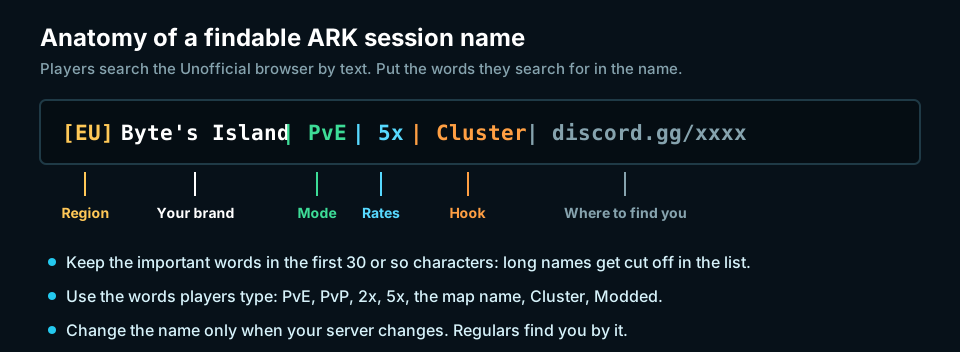
Set the name with SessionName under [SessionSettings] in GameUserSettings.ini, or with ?SessionName= in your start command. Most hosts also have a server name box in their control panel.
Two more settings help new players stay:
- A message of the day. Under
[MessageOfTheDay]inGameUserSettings.ini, setMessage=to a welcome, your rules in brief and your Discord link. Players see it when they join. - No password on a public server. Many players browse with password-protected servers hidden.
If your server does not appear in the list at all, check that the query port (27015 by default) is open, and that players are searching ARK: Survival Evolved and not ARK: Survival Ascended. They are separate games with separate server lists.
Regulars can skip the search by adding your server to their Steam favourites: in Steam, open View, then Game Servers, then Favorites, click the + and enter your IP with the query port, such as 203.0.113.42:27015.
Build A Home Base On Discord
Every advert you post should point to one place that answers new players' questions. For most ARK communities that is a Discord server, often with a simple website alongside it.
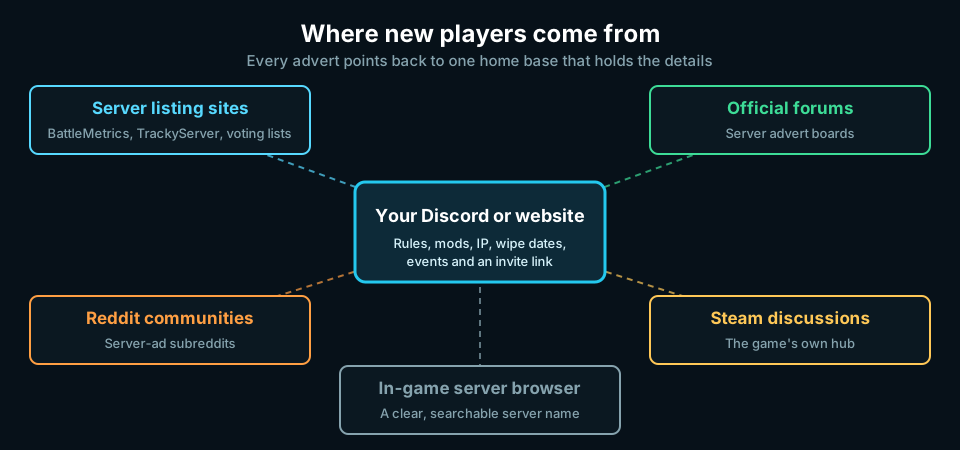
Give it:
- Connection details: server name, IP and query port, and the mod list. A Steam Workshop collection lets players subscribe to every mod in one click.
- Rules, including PvP rules and base limits.
- Your settings: rates, breeding times, stack sizes and the wipe schedule. Players ask about these before they join.
- An announcements channel for restarts, updates, wipes and events.
- A support or tickets channel so players can reach an admin.
A Discord also brings players back. When you run an event or change the rates, everyone who joined it hears about it.
List Your Server On Tracking And Voting Sites
Server listing sites are where players compare servers by player count and uptime.
- TopServer.Network's ARK server list ranks unofficial ARK: Survival Evolved servers by the players we see on them, with filters for map, PvE or PvP, mods and clusters. Busy servers are added from Steam automatically. Listing is free: use List Your ARK Server to add a community of up to 20 maps, or open your server's page and click Claim this server, then put the short code we give you in your
SessionNamefor a few minutes. A claimed listing shows your rules, rates and Discord link, groups all your maps into one community, and appears above unclaimed servers. Every server also has a vote page that players can use once every 24 hours, no account needed. - BattleMetrics tracks ARK servers through Steam, so your server will usually appear on its own. Search for it, check the details, and link players to its page. A steady player count and uptime history there reassures new players.
- TrackyServer lets you add your server with a description and tags, and ranks servers by votes.
Voting sites reward activity: the more votes, the higher you rank. Ask regulars to vote, and make it worth their while. On a host that supports ARK Server API plugins, a vote reward plugin can pay players in-game points or items for each vote.
Post Adverts Where ARK Players Look
| Where | Notes |
|---|---|
| ARK Official Community Forums: Server Advertisements | Studio Wildcard's own board for server adverts. Still active in October 2026. |
| Steam: ARK: Survival Evolved Server Hosting & Advertisement | The game's Steam discussion board for server adverts. Quieter than the forums, but players browse it from inside Steam. |
| r/playarkservers | A subreddit for ARK server adverts and admin discussion. |
| r/SurviveTogether | A long-running subreddit for survival game servers. Put your platform and game in the title, such as [PC] [ASE]. |
Read each board's pinned rules before you post. Most limit how often you can advertise the same server. Keep adverts out of general ARK subreddits unless their rules allow them; the boards above exist so you do not have to.
A good advert reads like a player wrote it:
- A title with the facts: "[PC] [ASE] [EU] Byte's Island: PvE cluster, 5x rates, no wipes".
- What a new player gets: starter kits, a friendly tribe, regular events, active admins.
- The settings players ask about: rates, mods, maps, breeding and wipes.
- How to join: server name to search for, IP, and your Discord link.
- One or two screenshots of bases or events on your server.
Repost when you have news to share, such as a new map, a new season or an event, and reply to every comment. A thread where the admin answers questions does more than ten copies of the same advert.
Keep The Players You Bring In
Promotion fills a server; the first few hours decide whether new players stay.
- Make the start easy. A starter kit, a protected beginner area or a clear "where to build" note keeps new players from quitting after their first death.
- Be there. Answer in Discord quickly, and keep an admin online at your busiest times.
- Give people something to come back for: boss fights, breeding contests, building competitions, double-rate weekends.
- Tune the server. If players complain about the grind, adjust rates and stack sizes. Our free ARK Config Generator, Game.ini Generator and Max Level Generator write the files for you.
For more ideas, see How to Keep Players Active and Engaged and How to Build a Thriving Game Server Community.
Avoid Promotion That Gets You Banned
- Do not spam the same advert across boards or in other servers' Discords. Moderators remove it and may ban you.
- Do not fake your player count with bots or idle accounts. Tracking sites and players spot it, and it breaks most listing sites' rules.
- Do not buy votes or use vote exchange schemes. Voting sites delist servers that do.
- Do not use "official" in your server name or imply Studio Wildcard runs it.
Frequently Asked Questions
How do I get more players on my ARK server?
Give your server a session name with the words players search for (mode, rates, region), set up a Discord with your rules and settings, list and claim it on our ARK server list, BattleMetrics and TrackyServer, and post adverts on the ARK official forums, Steam and r/playarkservers. Then keep new players with starter kits, events and admins who answer.
Why can't players find my ARK server in the server list?
They need to search the Unofficial tab in ARK: Survival Evolved, not Ascended, using words from your session name, with password-protected servers shown if you use a password. Your query port (27015 by default) must also be open. If the server is new, give it a few minutes to appear.
How do I add my server to TopServer.Network's ARK list?
Use List Your ARK Server, or if your server is already listed, open its page and click Claim this server. Put the short code we give you in your SessionName for a few minutes; once we see it, the listing is yours. Listing is free.
Is it worth paying to promote an ARK server?
Start with the free channels: a searchable name, a Discord, tracking sites and adverts. Paid promotion on listing sites can help a server that already keeps the players it gets, but it will not fix a server that loses new players in their first hour.
Does this work for ARK: Survival Ascended?
Most of it does. The forums, subreddits, Discord and voting advice apply to both games. ARK: Survival Ascended has its own server browser and crossplay with consoles, so check its own settings. See How To Host An ARK: Survival Ascended Dedicated Server.
Can I advertise my server on the official ARK forums?
Yes. The Server Advertisements board on survivetheark.com exists for exactly that. Read its pinned rules first and post your server once rather than repeatedly.
Sources
Checked on 4 October 2026:
- ARK Official Community Forums: Server Advertisements, new posts that week
- Steam: ARK: Survival Evolved Server Hosting & Advertisement
- TopServer.Network ARK server list, BattleMetrics ARK server list and TrackyServer
- r/playarkservers and r/SurviveTogether, current server adverts
- ARK Wiki: Server configuration for
SessionName,[MessageOfTheDay]and the query port
Looking for a host? Compare ARK: Survival Evolved server hosting by price, locations and reviews.
 Server Setup
 Community & Growth
 Community & Growth